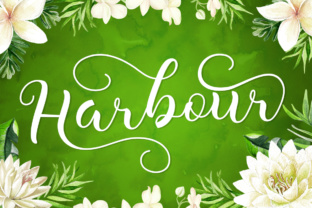
Harbour: A Modern Calligraphy Font for Refined Digital Design
As a web designer, choosing the right typeface can define the tone of a project before a single line of code is written. Harbour stands out as a modern calligraphy font that brings a sense of elegance and personality to digital spaces without sacrificing readability or function. Whether used in a hero header, product landing page, or boutique online store, Harbour bridges the gap between decorative appeal and practical web typography.
Harbour’s script style carries the fluidity of hand-drawn lettering, but with a balanced structure that ensures clarity on screen. Unlike overly ornate fonts, Harbour maintains legibility at various sizes, making it suitable for both large display text and smaller branded elements. The font’s natural flow and refined stroke contrast lend a polished, human touch to any digital interface.
How Harbour Enhances Web Layouts
In web design, visual hierarchy is key to guiding user attention and supporting content scanning. Harbour works exceptionally well in hero sections, logo text, and call-to-action buttons where a warm, approachable tone is desired. Its script form naturally draws the eye, making it ideal for headlines, brand names, and key conversion-focused phrases.
- Use Harbour in a coaching website’s headline to convey personal connection and professionalism.
- Apply it to a product landing page’s main title to highlight premium branding.
- Feature it in an online course banner to suggest creativity and expertise.
Because of its decorative nature, Harbour is best reserved for short-form text rather than body copy. It shines in digital spaces where a human, handcrafted feel enhances brand trust and user engagement. For best results, pair it with a clean sans serif or serif font for supporting content and navigation menus.
Readability Considerations for Digital Use
When integrating Harbour into a responsive website, consider how it performs across screen sizes and background treatments. On mobile, ensure that script elements are large enough to remain legible—typically 24px or larger for headlines. Avoid using Harbour in long paragraphs or small interface elements like form labels or secondary buttons.
For dark or light backgrounds, test contrast levels to maintain readability. When overlaying Harbour on images, consider adding a subtle background shape or text shadow to ensure legibility without compromising visual appeal. This approach works especially well in hero banners or portfolio site headers.
Font Pairing Strategies with Harbour
Successful web typography often relies on thoughtful font pairing. Since Harbour is a decorative script font, it pairs best with more neutral, structured typefaces. Here are some practical combinations:
- Pair Harbour with a geometric sans serif like Montserrat or Poppins for modern, clean layouts.
- Use it alongside a serif font like Playfair Display for editorial-style websites or digital magazines.
- Combine with a monospaced font for tech or coding-related landing pages with a creative twist.
These combinations help maintain a balanced visual rhythm while allowing Harbour to serve as the expressive focal point of the design. In brand-focused web experiences, using Harbour consistently across headers and logo elements helps reinforce brand identity and recognition.
Practical Applications for Harbour in Digital Projects
Harbour’s versatility makes it a valuable asset across a variety of digital design contexts. Here are a few real-world applications where Harbour can elevate the design:
- Creative Portfolio Sites: Use Harbour in the site header or project titles to reflect a designer’s personal style and attention to detail.
- Boutique Online Stores: Apply it to product banners, brand names, or promotional messages to convey a sense of craftsmanship and care.
- Coaching or Consulting Websites: Feature Harbour in testimonials or service headlines to communicate warmth and approachability.
- Course Sales Pages: Use it in the main headline or instructor name to add a personal, expert-driven tone.
- Social Media Graphics: Incorporate Harbour into branded templates for Instagram stories or Pinterest pins to maintain visual consistency across platforms.
Each of these use cases benefits from Harbour’s ability to communicate personality while maintaining a professional edge. Whether the goal is to build trust, guide conversions, or simply stand out visually, Harbour supports a refined yet expressive digital identity.
Technical and Licensing Considerations
Before implementing Harbour in a live project, check the font’s included styles, file formats, and webfont availability. Most premium script fonts like Harbour come with multiple weights, alternates, and ligatures to enhance typographic flexibility. Ensure that the font supports multilingual characters if the website serves a global audience.
From a licensing perspective, confirm that Harbour is cleared for commercial use across websites, client projects, and digital templates. Some fonts require separate licenses for different applications—especially when embedding in online stores or downloadable brand kits. Always review the end-user license agreement to avoid legal issues and ensure compliance.
Final Notes on Using Harbour
In the world of web design, typefaces like Harbour offer a rare combination of elegance and usability. When used thoughtfully, this script font enhances digital branding, improves visual hierarchy, and supports a cohesive online identity. Whether you're designing a landing page, portfolio site, or branded web content, Harbour delivers a refined, human touch that resonates with users and elevates the overall experience.